

You’ve successfully activated Shopify Markets Pro, congrats! You’ve just moved closer to becoming a truly outstanding person. We recognise that entering foreign markets might be intimidating, but it’s now simpler than ever with Markets Pro on your side. We’ve created a thorough checklist of recommended practises to help you get started on the road to international selling success. To increase your chances of success when using Markets Pro to sell overseas, heed these top recommendations.
Table of Content
- 1. Use Markets Pro labels to ensure duty collection
- 2. Expand your top areas’ markets and localise your customers’ buying experiences
- 3. Discover and expand global possibilities
- 4. Increase the volume of organic searches by adding subfolders
- 5. Improve your shipping rate policy
- 6. Increase conversion by having your store translated
- 7. Update the FAQs and shipping regulations for your store
- 8. Make marketing investments to boost growth in your overseas markets
- 9. Adapt to local consumer privacy laws
- 10. Get ready to receive payments every week
- Conclusion
1. Use Markets Pro labels to ensure duty collection
Every single international order must be filled using a shipping label created by Markets Pro from one of our partner carrier accounts. Markets Pro guarantees duties amounts, collects them on your behalf, and remits them to carriers and customs agencies. This is done to assure proper duties management. On international orders, you must use Markets Pro labels (this does not apply to domestic transactions), but how you fulfil such orders is up to you. Following are your choices:
Create labels using Shopify
Ascertain that your warehouse crew is familiar with the admin’s label retrieval process.
Utilise a 3PL that is compatible
Orders placed through Shopify Markets Pro can be filled by compatible fulfilment companies. The assistance documentation will be updated as the list of suitable partners expands.
Specific integration
Use Markets Pro labels only for non-domestic orders if you or your 3PL needs an integration; otherwise, make sure to follow the integration instructions.
2. Expand your top areas’ markets and localise your customers’ buying experiences
All international markets you can sell to are automatically created when Markets Pro is activated. To make sure you’re ready to sell anywhere right away, do this. You can create single nation markets to apply additional localization parameters to particular geographic areas. For instance, you may construct a market for a single nation called “Canada,” leaving the long tail of nations (the dozens of nations from whom you receive sporadic sales) in the brand-new international market that Markets Pro built for you.
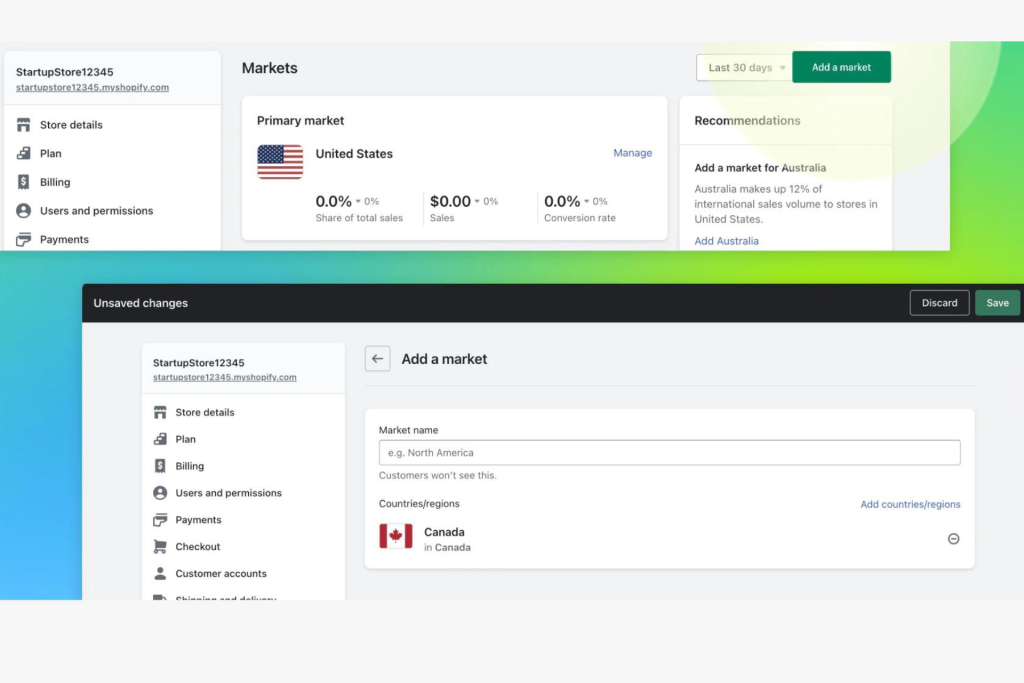
Benefits of establishing single-country markets
- So that clients are sent to the appropriate store experience, automatic redirection is enabled. (Note: Automatic redirection only works when you create distinctive URLs, such as subfolders.)
- In areas where privacy laws forbid automatic redirection, the Geolocation feature will automatically produce a pop-up advising users to go to the appropriate URL.
- Pricing that is tailored to the market is something you can do.
- For that nation, you can make specific content for your store.
3. Discover and expand global possibilities
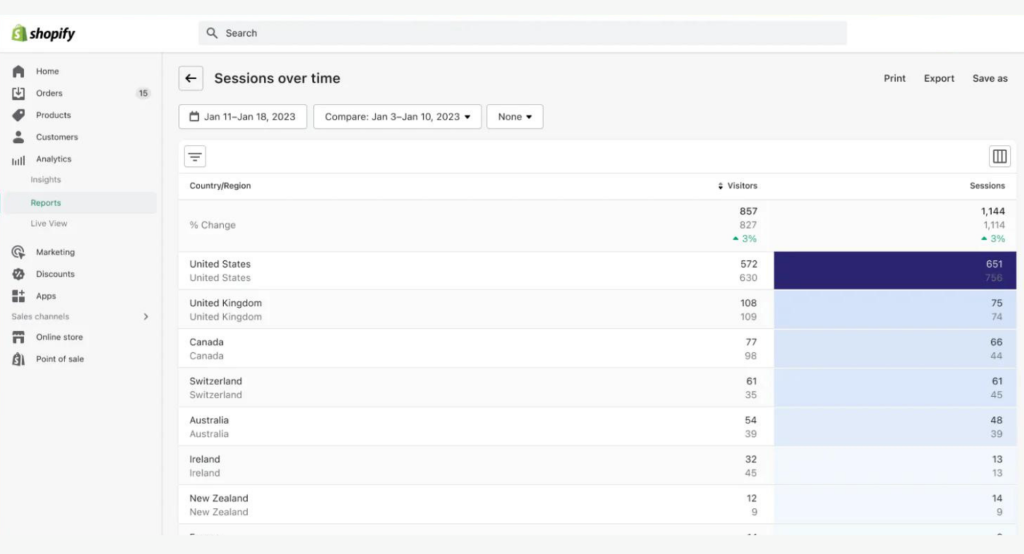
Look at the analytics for your store to see where organic traffic is coming from. Make sure you’ve built up markets for these areas so you can better turn this traffic into sales. You can achieve this by include these nations in the global market or by establishing one or more new markets.
4. Increase the volume of organic searches by adding subfolders
A localised extension to your URL called a subdirectory will improve SEO in that nation. When subfolders are enabled, organic search volume increases by more than 10% on average.
Guidelines for subfolders
Although subfolders increase exposure in organic searches, take care not to generate too many unique URLs. For countries or regions where you are primarily focusing on growth and/or have distinctive experiences or diverse content, we advise developing single-country markets with subfolders.
It is not advisable to have distinct subfolders based just on the use of a local language or currency; instead, the experience should be varied based on the site’s unique structure or content. For instance, if your company is situated in the US and you sell to both France and Canada, both of which have French as their primary language, you would be better suited addressing French speakers in both countries on a single shop.com/fr subdomain. You would only desire a distinct country-language subfolder combination like shopxyz.com/fr-ca and shopxyz.com/fr-fr if you had different experiences between the two (for example, different prices, pictures, or different product catalogues).
5. Improve your shipping rate policy
When activated, Markets Pro will provide recommendations on the shipping costs to charge clients in various nations. You will be given the choice between dynamic prices that account for your label expenses each order or flat rates that are based on your estimated average label costs. Alternatively, you can decide against using those services and decide on your own shipping costs. Consider your business objectives if you choose to set your own rates:
Setting rates to provide margin priority
If protecting margins is your priority, you might choose to charge fixed rates (to cover your average label cost) or dynamically computed rates (to pass along the cost on an order-by-order basis).
The flat rate method is typically the best option for customers since it informs them of the shipping costs up front, allowing them to consider them before making a purchase rather than waiting until they reach the checkout page. With the assurance that the shipping fee won’t fluctuate, flat rates encourage customers to add more items to their carts and raise the average purchase value.
Consider setting two flat rates to offset the greater cost for heavier products (e.g., 1 to 8 pounds and 9 to 20 pounds) if you adopt the flat rate technique and sell a variety of product sizes (e.g., 1 to 20 pounds).
A rate structure that prioritises growth
Keeping shipping costs low could help raise checkout conversion if your goal is to increase global sales volume. Consider subsidising shipping costs by charging customers less than the cost of the label. You can achieve this by establishing flat-rate delivery discounts and/or free shipping options.
Subsidising label costs is a widespread practise, keeping shipping costs low while raising overseas product prices to make up for the subsidy. This strategy protects margins while encouraging increased checkout conversion. This strategy is especially advised if you’re switching from providing conventional shipping methods to express shipping.
6. Increase conversion by having your store translated
By translating the content on your Shopify store for other countries, you may increase traffic, strengthen your SEO, and gain the trust of consumers worldwide. When a storefront is translated into the native tongue of a customer, brands often notice a 13% increase in conversion rates.
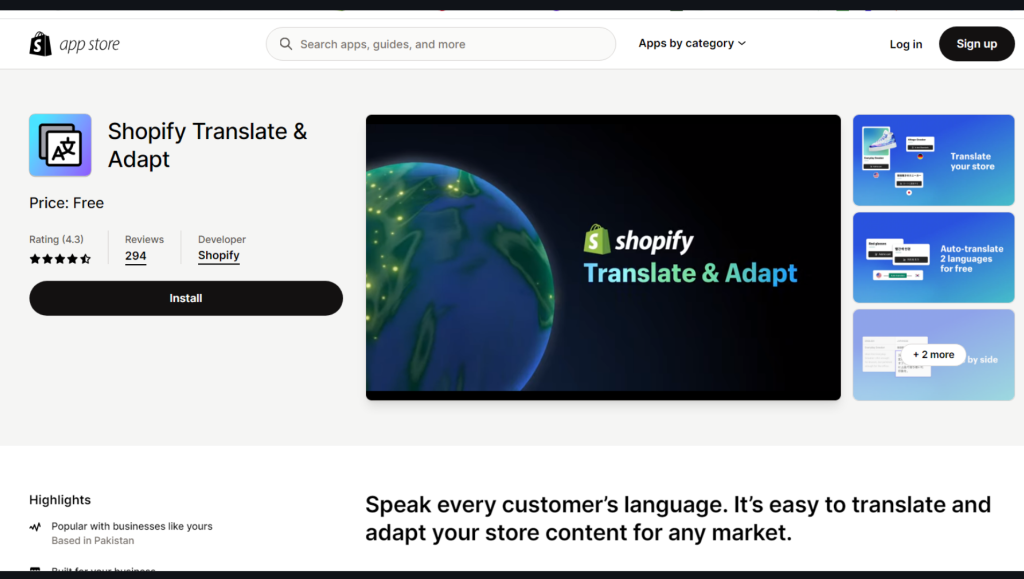
Shopify created the Translate & Adapt software especially for Shopify. You can manually add as many translations as you like while it automatically translates up to two languages for free. With the help of the side-by-side editor, it is simple to compare and evaluate your translations. It can also be used to adapt content for markets that share the same language in order to maintain cultural, seasonal, and geographic relevance.
7. Update the FAQs and shipping regulations for your store
In order for customers to understand the new advantages of your online store, update your store’s shipping rules. For instance:
- A list of the nations you ship your goods to.
- There will be no unexpected charges at delivery because duties and taxes are added at the time of purchase.
- Anywhere in the world, packages delivered by express shipping and pre-customs clearance arrive between one to five days.
- At the checkout, customers can pay with a local payment option and their own local currency.
8. Make marketing investments to boost growth in your overseas markets
It’s your responsibility to increase brand awareness in these new regions now that regions Pro is handling the operational complexities and customer experience for your international firm. To increase your consumer base and promote global sales, start investing in marketing efforts in your most important secondary markets.
Creating Traffic
Make regionally focused campaigns: We advise dividing your campaigns and localising both their copy and visuals to maximise advertising in new locations. Localise information like language, pricing, and product availability to the buyer’s regional preferences if you employ dynamic retargeting in Facebook, Google, or Pinterest. When it comes to presenting the local language and currency with your social advertising and retargeting, you have a variety of alternatives.
Here are some suggestions that are compatible with Shopify Markets:
To understand more about advertising on social media networks, look at these guides:
Verify the industry- and location-specific advertising guidelines for the ad platform you’ve selected.
Find regional influencers and collaborate with them: In the new areas you are expanding to, regional influencers can help you increase sales, convert new customers, and boost traffic. With Shopify Collabs, the influencer marketing tool that is already included in your admin, it is simple to get in touch with the relevant influencers. Install Collabs from the app store, create your brand profile, and click Recruit to begin hiring creators.
You may search and sort through a sizable database of influencers there by geography, keywords, social media platform, audience size, and other criteria. Sending samples, providing incentives in the form of affiliate commissions, monitoring performance, and disbursing commissions can all be done directly from Shopify. Collabs is also free to install as part of your Shopify plan.
Lead generation and nurturing
- Create first-purchase incentives for buyers from abroad: Look through your present customer list to discover if there are any existing clients that reside in your new markets but haven’t made a purchase from you because you didn’t sell there at the time. Save that section, create a special discount that only that segment can enjoy, and then send that segment a Shopify email announcing the deal and your new availability there.
- Update or add a quick response in Shopify Inbox: By upgrading the pre-populated responses customers can discover in your Shopify Inbox online store chat, you can inform international clients about your new shipping options in the new countries.
- To expand your email list, add Shopify Forms to your online store: Making the most of each customer visit is crucial when promoting your store in a new market because you are investing time and money to get customers in. Even if a potential customer isn’t ready to make a purchase, you can email them and establish a relationship using the free lead gathering tool Shopify Forms, which makes it simple to offer discounts or other advantages for signing up.
9. Adapt to local consumer privacy laws
Markets Pro has access to data that is GDPR compliant through Shopify’s checkout, but this does not imply that the merchant or the data/cookies that the merchant has access to when a customer visits their storefront are also compliant.
To abide by UK and EU consumer privacy laws, merchants must employ explicit opt-ins. To handle consent and data sharing and foster customer trust, think about adding Shopify Privacy and Compliance.
See third-party cookie tracking applications that prevent tracking or offer data/cookie control for more choices.
10. Get ready to receive payments every week
Markets Pro deposits display as “Flow Commerce” on your banking statement and occur four times per month. The steps listed here can help you locate payout information in your admin.
- Go to Finances > Payouts in your Shopify admin.
- Then select “Transactions.”
- Then select “More filters.”
- Then select “Payment method.”
- Simply click “Markets Pro.”
- Choose “Done.”
11. A/B Testing Continuously
Continuously A/B test many aspects of your store, like as design, copy, and pricing, to see what appeals to each market the most. Small changes can have a big impact on performance overall and conversion rates.
Conclusion
For your online store, activating Shopify Markets Pro opens up a world of possibilities. You can maximise the potential of your store, increase sales across markets, and broaden your consumer base by putting the ten optimisation tactics covered in this blog into practise. Keep in mind that achieving success in global expansion takes ongoing effort, adaptation, and knowledge of various client needs. Build a successful and long-lasting global e-commerce business by regularly evaluating your store’s performance, making adjustments to your tactics, and staying up to date with industry developments. Good luck!
Join us as you begin your Shopify journey
We are e-commerce specialists and Shopify Partners. Get in touch with us if you need assistance with Shopify, need a whole website built, or have any other general questions.