
In the current digital era, creating a strong online presence is essential for businesses to prosper. In terms of online visibility, Google’s position as the industry leader in search engines is crucial. The Google Knowledge Panel is one effective technique that can dramatically improve a company’s internet visibility. This article will go in-depth on what the Google Knowledge Panel is, why it’s important for your company, and how to use it to your advantage to stand out in the digital space.
Table of Content
- What is the Google Knowledge Panel?
- Where does Google get the info for knowledge panels?
- How to optimize your Google knowledge panel
- Why is the Google Knowledge Panel Important?
- How to Make Your Knowledge Panel Claimable and Effective
- Knowledge panels’ limitations
- Other helpful advice for business owners
- Conclusion
What is the Google knowledge panel?
On the right side of Google search results, there is a dynamic information window called the Knowledge Panel. It offers crucial details on a company, person, location, or other entity, enabling visitors to learn more about the issue immediately without having to sift through numerous search results. It’s the instantaneous snapshot that sums up your brand in a handful of seconds.
You can find the traditional list of blue links by searching for “WizeSaaS” on Google. However, there is also a box visible on the right side of the page. A feature Google launched in 2012, this box is a Google knowledge panel. The Google Knowledge Panel was created with the intention of providing quick answers to frequently asked queries on the SERP.
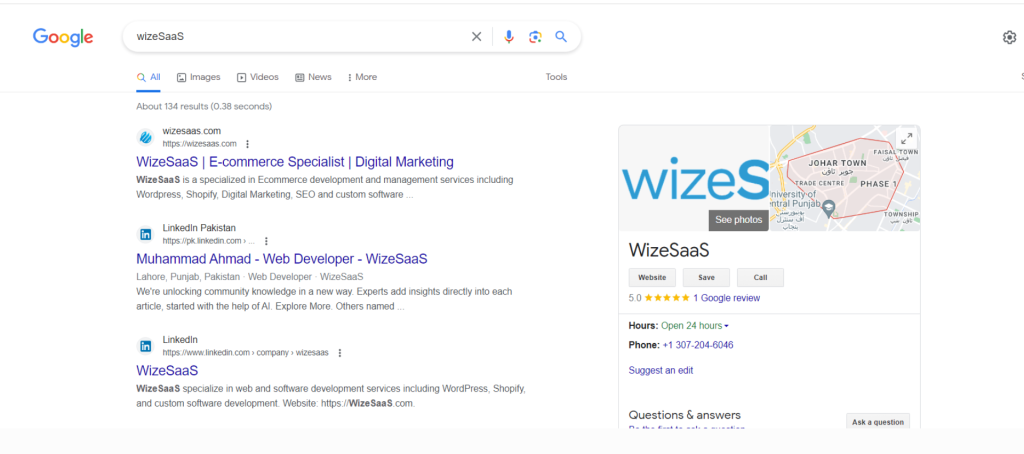
From the standpoint of marketing, this would appear to be a bad thing. After all, why would users click through to your website if they can get the answers to their questions on the SERP? However, by being aware of how these knowledge panels operate, you can better manage online brand perception and raise brand awareness.
Where does Google get the info for knowledge panels?
Google’s Knowledge Graph, which it debuted in 2012, provides the data for its knowledge panels. A database with billions of facts culled from the internet is called the Google Knowledge Graph. Google often modifies its knowledge graph algorithm, and modifications to the knowledge graph may result in modifications to its knowledge panels. People can make claims for knowledge panels and ask that the material be changed.
Although an entity can select a featured image as well, the photos in a knowledge panel are pulled from Google photos results.
How to optimize your Google knowledge panel
Once you have taken ownership of your Knowledge Panel, you can refine it to make it as precise and educational as possible. Here are some pointers:
- Ensure that the knowledge panel’s content is current and accurate.
- Use keywords that customers are likely to type into search engines to find your company.
- Include connections to your social media profiles and website.
- React to client feedback.

Why is the google knowledge panel important?
First impressions are important
The Knowledge Panel is frequently the user’s initial point of contact with your company in search results. It serves as your online storefront and gives potential buyers their first impression, which can either entice or turn them away.
Credibility and trust
A Knowledge Panel that is well-optimized can give your company credibility and trust. Users are more likely to interact with brands that present themselves in a professional and educational manner.
Direct information
Users may get key information such as contact data, opening hours, a link to your website, client testimonials, and more without having to visit your website. This convenience can enhance user experience and promote participation.
Features of knowledge panels
The knowledge panel’s content will vary depending on the topic. If you look up a business, you might find:
- The name of the company and its location.
- A picture or pictures, such the storefront or company logo.
- A succinct explanation.
- Financial data including the stock price at the time and yearly revenue.
- Structured data, such as parent businesses or subsidiaries.
- Historical details including antecedents, founders’ names, and the year of establishment.
- Links to Facebook, Instagram, and LinkedIn pages, among other social networking platforms.
- A section called “people also search for” with relevant terms like business rivals.
How to make your knowledge panel claimable and effective
Set your panel up
Your Knowledge Panel must be verified in order to be claimed. Make sure you have a Google My Business (GMB) account and that your business information is accurate before you begin the procedure.
Finish off your GMB profile
Give current, factual information about your company. Include the following information about your company: business type, name, address, and phone number.
Put structured data markup to use
Include structured data markup on your website. By doing this, you aid Google’s engines in better comprehending your content and displaying pertinent information in the Knowledge Panel.
Display top-notch pictures
Pictures have an influence that lasts. Post photographs in high resolution that accurately represent your company’s name, products, services, and location.
Knowledge panels’ limitations
Google’s knowledge panels provide you a fast overview of a subject, but they can’t replace thorough research. Knowledge panels occasionally contain false information since they are automatically obtained from the internet by an algorithm and because any user can submit updates to knowledge panels.
Remember to use a reliable source while using a knowledge panel, such as the organization’s official website and social media accounts, a respectable newspaper, or a government website. For information on earnings of publicly traded firms, for instance, see the website of the US Securities and Exchange Commission (SEC). By using the Feedback button, you can let someone know if a knowledge panel contains any incorrect information.
Knowledge panels are constricting for business owners because you cannot directly manage or alter them. Remember that a knowledge panel differs from a Google business profile, which appears in the same spot and includes business-provided information.
Other helpful advice for business owners
- Check your panel: Check your Knowledge Panel frequently for accuracy and any possible changes. Google may change the data without informing you.
- Use google posts: Share updates, promotions, and announcements within your Knowledge Panel by using the Google Posts tool.
- Maintain engagement: Interact with your audience and swiftly address consumer inquiries. Positive brand perception may result from this engagement.
- Seek professional assistance: If you find the optimisation procedure to be overwhelming, you might want to hire digital marketing experts who have experience with Google My Business optimisation.
Conclusion
The Google Knowledge Panel is a potent tool that can influence how users view your company. It’s more than just an information box. You may increase your online visibility, authority, and user interaction by claiming and optimising your Knowledge Panel. Always keep in mind how important it is to make a good first impression in the hectic digital world of today. So put in the time and effort to learn how to use the Google Knowledge Panel, and then watch as your company grows online.
Join us as you begin your Shopify journey
We are e-commerce specialists and Shopify Partners. Get in touch with us if you need assistance with Shopify, need a whole website built, or have any other general questions.